
Your web designer says WordPress. A developer friend says that's bloated. You have quotes that differ by thousands of pounds and no way to judge which is right. Meanwhile the site you already have loads slowly, breaks after updates, and costs more every year in plugin renewals you never agreed to. The hand-coded vs WordPress decision is not really about code. It is about how often you publish, who maintains the thing, and what you are willing to pay over five years.
The short answer
Choose hand-coded if your site is mostly services, proof and contact routes, you publish less than monthly, and you want the lowest running cost and the fewest things that can break.
Choose WordPress if non-technical people on your team need to publish weekly, or you need genuine e-commerce, memberships or user accounts.
Most UK small businesses fall into the first group and get sold the second.
What hand-coded actually means
A hand-coded site is written directly in HTML, CSS and JavaScript. There is no theme framework, no page builder, and no plugin stack loading in the background.
The browser receives the files your site needs, and nothing else. No database query runs to display your services page, because there is no database. The page already exists.
That is the whole difference, and every advantage below follows from it.
What WordPress actually is
WordPress is a content management system. It stores your content in a database and assembles each page when someone requests it, combining your theme, your plugins and your content into a finished page on the fly.
It is the most widely used CMS in the world, and it earned that position honestly. The trade-off is that assembling pages on demand costs speed, the plugin ecosystem costs money and maintenance, and the login page and database create a security surface a static site does not have.
Speed: where the gap is real
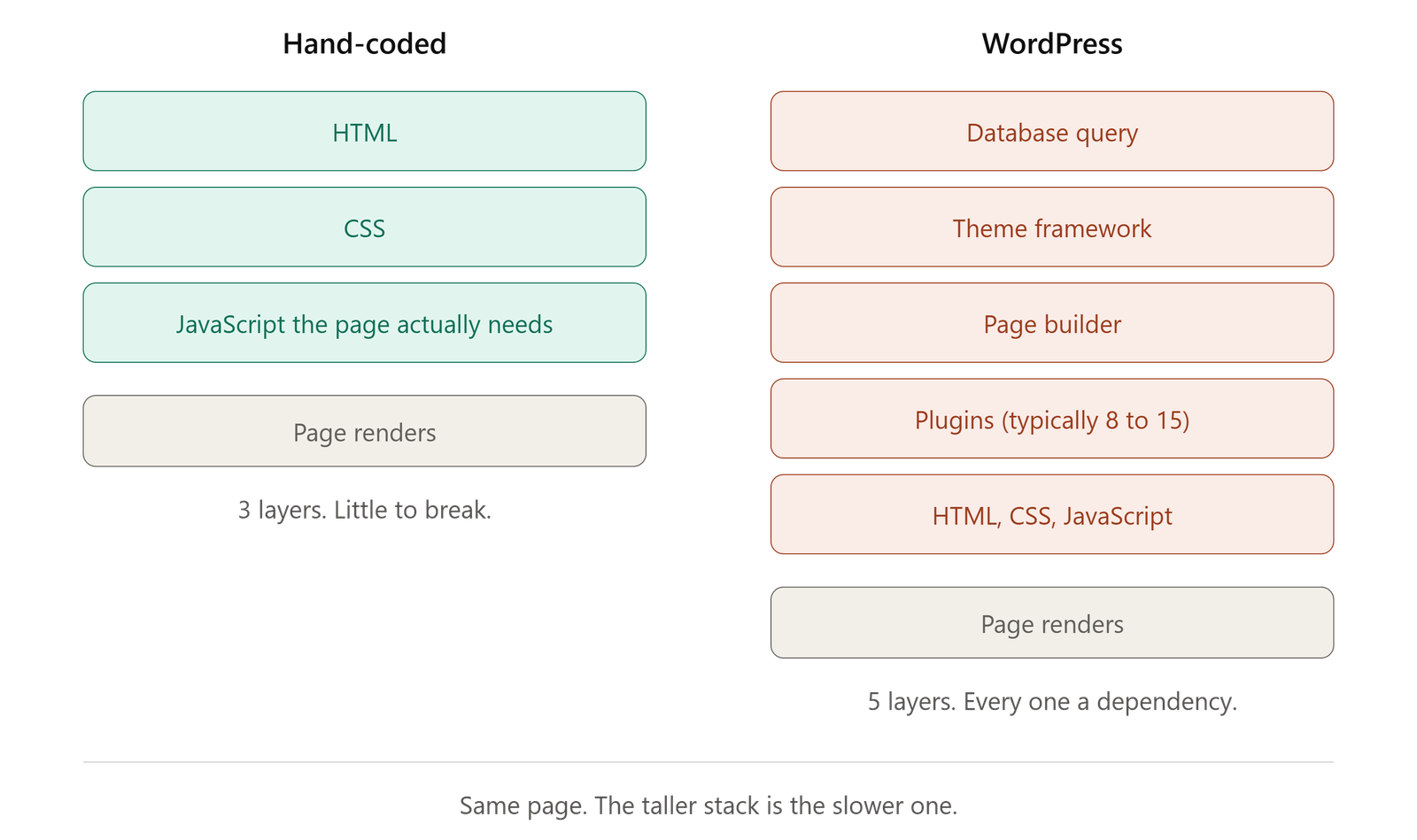
Speed is a weight problem before it is anything else.
Google's own guidance sets 2.5 seconds as the threshold for a good Largest Contentful Paint score, according to the Largest Contentful Paint documentation published on web.dev. Miss it and you are losing visitors before they read a word.
An analysis published by Search Engine Journal in 2026, drawing on real-world Chrome data from the HTTP Archive Core Web Vitals report, found that WordPress sites ship a median page of roughly 2.76 MB, while Astro-built sites ship roughly 1.65 MB. On real-world Core Web Vitals, 49% of WordPress sites passed Google's good threshold against 67% for Astro.
That is field data from actual sites, not a lab benchmark, and it matters more than either. WordPress can be fast. Getting there means caching configuration, image optimisation, database tuning and a CDN, which is four more systems to maintain and four more things that can break.
A hand-coded site starts fast and stays fast because there is nothing to optimise away. If your current site is slow and you are not ready to rebuild, website speed optimisation can often close most of the gap without changing platform.
Security: fewer doors to lock
A static hand-coded site has no database to breach, no admin login to brute-force, and no plugins carrying someone else's vulnerabilities.
This is not a small consideration. The UK Government's Cyber Security Breaches Survey 2025, published by the Department for Science, Innovation and Technology, found that 43% of UK businesses experienced a cyber security breach or attack in the preceding twelve months. Outdated website software is one of the most common ways in.
WordPress sites can be well secured. Doing it properly means keeping core, themes and plugins current, running a security plugin, enforcing two-factor authentication, and maintaining tested backups. That is ongoing work, and it is work that stops the moment someone gets busy.
A hand-coded site needs almost none of it by design. Not because it is cleverer, but because there is less of it.
The real cost over five years
Build cost is the number everyone compares. It is the wrong number.
The figure that matters is what the site costs to own, and the categories that make up the difference are almost entirely invisible at quote stage. Here is what a typical builder-based site carries that a hand-coded one does not:
|
Recurring cost |
Hand-coded |
WordPress |
|
Page builder licence |
None |
Annual |
|
Premium theme licence |
None |
Annual |
|
Form plugin |
None |
Often annual |
|
Backup plugin |
None |
Often annual |
|
Security plugin |
None |
Often annual |
|
SEO plugin (premium tier) |
None |
Often annual |
|
Hosting |
Low, static-friendly |
Higher, managed WordPress |
|
Maintenance time |
Minimal |
Monthly updates and testing |
Individually each line looks trivial. Together they frequently exceed the cost of a website care plan, which is the part most owners never work out until they add it up.
Then there is the cost nobody budgets for: the afternoon a plugin update breaks the layout two days before a campaign launches.
Run this ten-minute plugin audit
Before you decide anything, find out what your current site actually costs. This works whether or not you ever change platform.
-
Log into your site and open the plugins list. Count them.
-
For each one, note whether it is free or paid, and what it renews at annually.
-
Check your hosting invoice for the real annual figure, not the introductory rate.
-
Add your theme and page builder licences.
-
Add whatever you pay anyone for updates and maintenance.
-
Divide the total by twelve.
Most small business owners running this exercise are surprised by the monthly number. That figure, not the original build quote, is what you should be comparing.
If the total is uncomfortable and you want the WordPress site kept properly in the meantime, WordPress maintenance is a separate decision from rebuilding.
The editing question, answered honestly
This is the real objection, and it deserves more than the sentence it usually gets.
The argument for WordPress is that you can log in and change things yourself. That is genuinely valuable, and on a hand-coded site you generally cannot restructure a page layout without a developer.
But the question worth asking is not "can I edit it myself?" It is "how often will I actually publish?"
Plenty of business owners insist on editing access, use it twice in the first month, and never log in again. Meanwhile they have paid for a heavier, slower, more fragile site to preserve a capability they do not use. If you publish weekly, that capability is worth real money. If you update your opening hours twice a year, it is not.
There is also a middle answer. A hand-coded site can pair with a headless CMS so editors get a clean writing interface without the plugin stack underneath. And on a managed hand-coded website design build, content edits are usually included in the care plan, so a text change costs an email rather than a login.
Be honest with yourself about the publishing frequency. It is the single most useful input to this decision.
SEO: the difference is effort, not ceiling
Both platforms can rank. Anyone telling you WordPress cannot rank is selling something.
The difference is what it takes to get there. A hand-coded build gives you direct control over the things technical SEO actually depends on: heading structure, canonical tags, schema placement, internal linking, crawl paths and page weight. Nothing fights you.
WordPress reaches the same place through plugins, which work well but add configuration, conflicts and maintenance. Page builders in particular tend to produce extra wrapper markup, occasionally duplicated H1s, and inconsistent templates across pages.
Neither is disqualifying. It is a question of how much effort sits between you and a clean technical foundation.
When WordPress is genuinely the right answer
WordPress is the correct choice, not a compromise, when:
-
Non-technical people on your team publish weekly or more often
-
You have multiple content editors with different permission levels
-
You need real e-commerce with inventory, variants and order management
-
You need memberships, gated content or user accounts
-
You depend on an integration that only exists as a WordPress plugin
-
You already have a well-built WordPress site that is fast and stable
That last one matters. If your WordPress site works and performs, rebuilding it to prove a point is a waste of your money.
What happens if you leave
Ask any prospective supplier this before you sign anything: if I want to move next year, what do I take with me?
With WordPress, the answer involves hosting, a theme licence, plugin licences, database access, page builder dependencies and a content export. A site built around a proprietary page builder can be genuinely difficult to move, because the layouts often do not survive the transition.
With a hand-coded site, the files are the site. Domain, content, code and hosting are all portable.
The answer to that question tells you more about a supplier than their portfolio does.
How to decide
Three questions, in order.
Will non-technical people publish weekly? Yes means WordPress. No, continue.
Do you need e-commerce, memberships or user accounts? Yes means WordPress. No, continue.
Is your five-year running cost more important than self-service layout editing? Yes means hand-coded.
Most local service businesses answer no, no, yes, and get sold WordPress anyway, usually because it is what the supplier builds rather than what the business needs.
Where to start
Run the plugin audit first. It costs you ten minutes and it turns an argument about platforms into a number you can act on.
If the number surprises you, get in touch and we will tell you honestly whether a rebuild makes sense for your situation or whether your existing site is worth keeping. Our pricing is published, so you can work out the comparison before you speak to anyone.