Your website worked perfectly on launch day. Since then, nobody has really looked at it. Plugins have fallen behind, the security certificate renews when it feels like it, and you only find out the contact form is broken when a customer phones to ask why you never replied.
A website maintenance plan exists to stop that slow decay. Here are the benefits that actually matter, the UK data behind them, and an honest look at when you need one and when you don't.
What is a website maintenance plan?
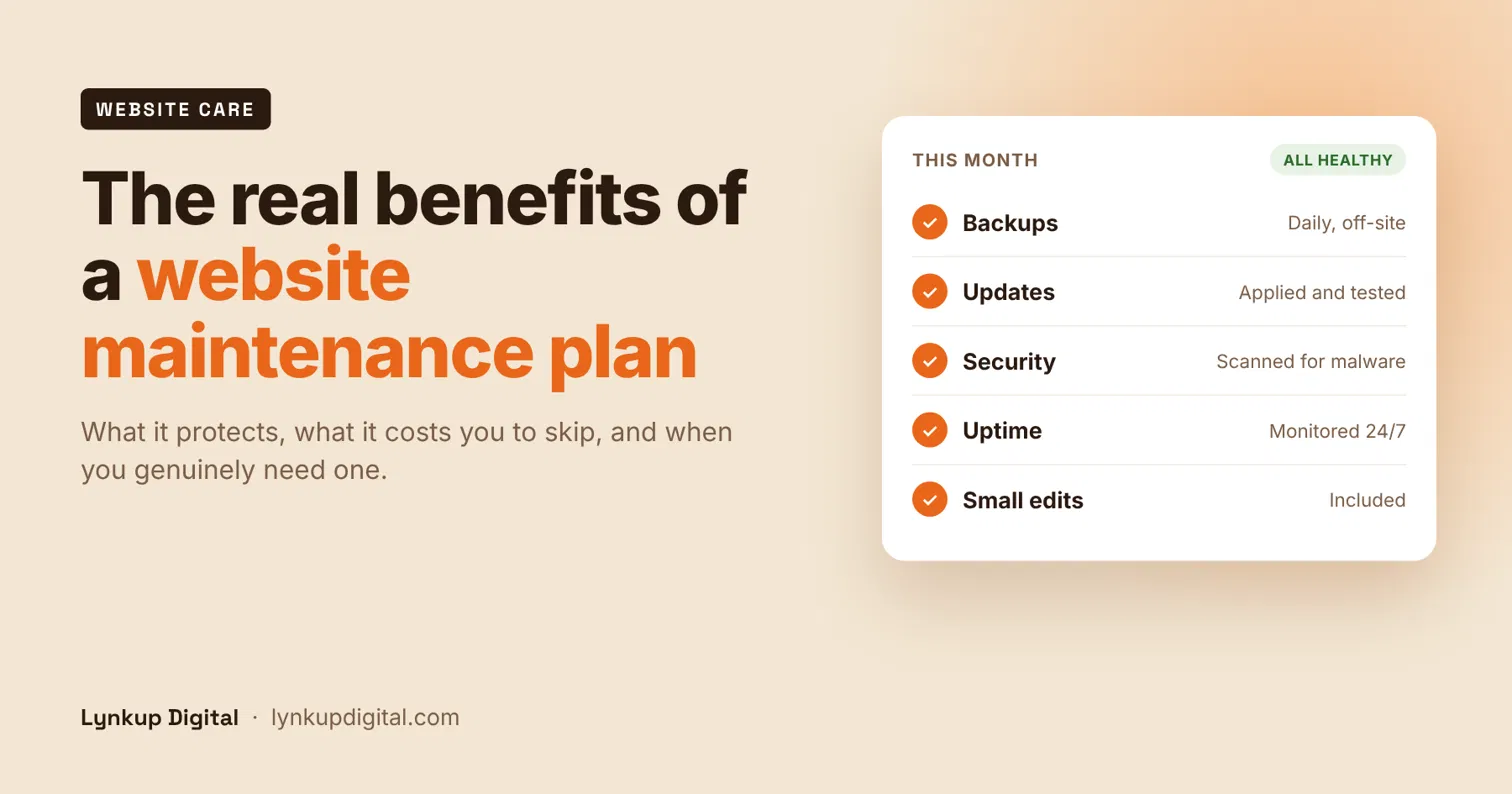
A website maintenance plan is a monthly service where someone looks after your site for you: backups, software updates, security checks, uptime monitoring and small content changes. You pay a fixed fee, and the routine work that keeps a website healthy gets done every month instead of whenever someone remembers.
It is different from hosting. Your host keeps the server running. It does not check whether your plugins are current, whether your forms still send, or whether someone has slipped spam links into your footer. That gap is exactly what a website maintenance plan fills.
Benefit 1: Fewer security holes left open
The most important benefit is that security updates get applied quickly, before attackers use the flaws they fix.
The risk is not theoretical. According to the UK Government's Cyber Security Breaches Survey 2025/2026, published by the Department for Science, Innovation and Technology and the Home Office, 43% of UK businesses identified a cyber security breach or attack in the previous 12 months. For small businesses with 10 to 49 staff, the figure was 46%.
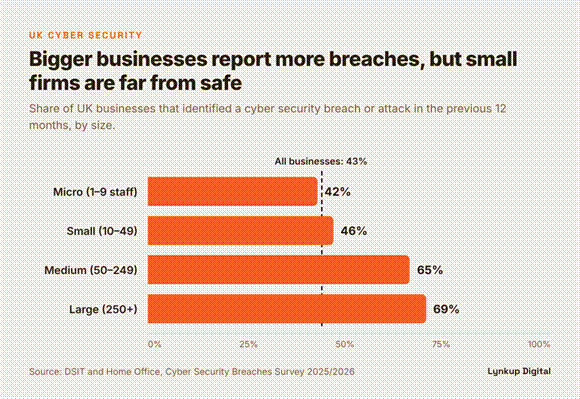
Source: Cyber Security Breaches Survey 2025/2026, DSIT and Home Office.
Now look at how quickly businesses patch. The same survey found that only 34% of UK businesses apply software security updates within 14 days.
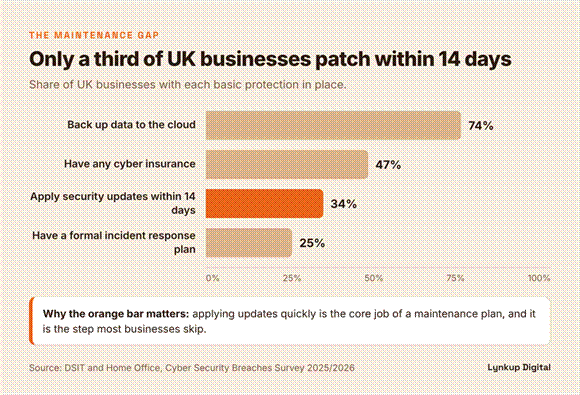
Source: Cyber Security Breaches Survey 2025/2026, DSIT and Home Office.
That 14-day window matters more than it sounds. Patchstack's State of WordPress Security in 2026 report found that heavily exploited WordPress vulnerabilities were mass-exploited in a median of just five hours. If your updates wait two weeks for a quiet afternoon, attackers have a very long head start.
Benefit 2: Plugin risk managed for you
If your site runs on WordPress, the biggest threat usually isn't WordPress itself. It's the plugins.
Patchstack's report counted 11,334 new vulnerabilities in the WordPress ecosystem in 2025, a 42% rise on the year before. Of those, 91% were in plugins and 9% in themes. WordPress core had only six.
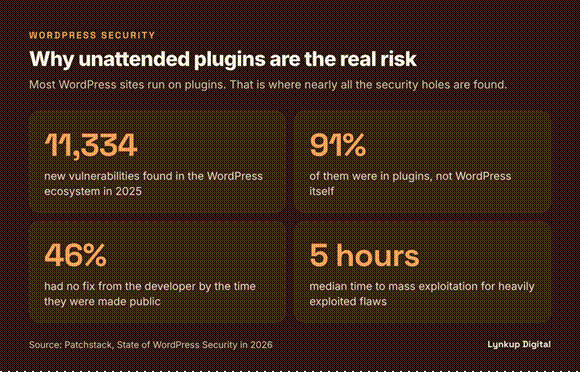
Source: Patchstack, State of WordPress Security in 2026.
There is a harder number too. Patchstack found that 46% of vulnerabilities had no fix from the developer by the time they were made public. In those cases, updating isn't enough. Someone has to notice the risk and disable, replace or protect the plugin.
That is specialist work, and it is the core of good WordPress maintenance. A plan means a person checks each update before applying it, tests the site afterwards, and acts when a plugin you rely on has a known hole with no patch.
Benefit 3: Backups you can actually restore
A maintenance plan gives you regular, off-site backups that are tested, so recovering from a disaster is a decision rather than a gamble.
The government survey found that 74% of UK businesses back up data to the cloud. That sounds reassuring until you ask two questions most owners can't answer:
• Does the backup include your website, or only office files?
• When was a restore last tested?
A backup that has never been restored is a theory. Good plans store copies away from your server, keep several versions, and test a restore periodically. If your site is hacked, broken by an update or deleted by mistake, you lose hours, not your whole online presence.
Benefit 4: Problems caught before customers notice
Uptime monitoring checks your website around the clock and alerts the team the moment it goes down, often before any customer has tried to visit.
Without it, downtime is usually discovered by accident. A customer mentions it, or you open the site yourself days later. Every hour in between is lost enquiries, lost sales and a little lost trust.
The same goes for quieter failures. Contact forms stop sending after a server change. An SSL certificate expires and browsers start warning visitors away. Checkout pages break after a plugin update. These rarely announce themselves, and they are exactly what routine checks are designed to catch.
If you run an online shop, this benefit is worth the fee on its own. Downtime at checkout costs real money, which is why dedicated plans for e-commerce stores prioritise faster response times.
Benefit 5: A faster site, kept fast
Speed decays as well. Images get uploaded at full size, plugins pile up, and a site that loaded quickly at launch gradually slows down.
Google's guidance on Core Web Vitals sets 2.5 seconds as the threshold for a good Largest Contentful Paint, the time it takes for a page's main content to appear. Slow sites lose visitors before they read a word, and speed feeds into how Google assesses page experience.
A maintenance plan includes regular checks that keep you under that line: compressing images, removing unused plugins, and keeping software current. If your site is already slow, a one-off round of speed optimisation usually comes first, and the plan stops the problem creeping back.
Benefit 6: Small changes done without the hassle
The benefit owners value most is often the simplest: someone else makes the small edits.
New opening hours, a price change, a new team member, a seasonal offer. On a plan, these are usually included and turned around quickly. Without one, they either wait in a freelancer's queue, get billed by the hour, or never happen at all, which is how websites end up quietly out of date.
Benefit 7: Lower, more predictable costs
A fixed monthly fee replaces the unpredictable bill for an emergency fix.
Emergency work is always the expensive kind. Cleaning up a hacked site, recovering lost data or rebuilding after a failed update costs far more than routine care, and it arrives at the worst possible moment. On a plan, problems caused by the maintenance team's own updates are typically fixed at no extra charge, and genuine emergencies jump the queue.
There is a time cost too. Doing maintenance yourself means learning which updates are safe, testing after each one, and knowing what to do when something breaks. For most business owners, that is not a good use of their hours.
What a maintenance plan won't protect you from
A maintenance plan protects your website. It does not protect your whole business, and anyone who says otherwise is overselling.
The government survey found that phishing was by far the most common attack, experienced by 38% of UK businesses. Phishing targets your inbox and your staff, not your website. A maintenance plan won't stop someone clicking a fake invoice email or reusing a weak password.
So treat a plan as one layer, not the whole defence. Pair it with staff awareness, two-factor authentication on email and banking, and good password habits. The survey also found only 25% of businesses have a formal incident response plan, which is worth fixing alongside your website.
Signs your website already needs maintenance
If any of these sound familiar, your site is overdue for attention:
• The admin dashboard shows a list of pending updates. Every one of those is a known fix you haven't applied yet.
• You can't remember when the site was last backed up, or you don't know where the backups are kept.
• Pages feel slower than they used to, especially on your phone.
• Enquiries have dropped off for no obvious reason. Test your contact form. Silent form failures are more common than most owners think.
• Your browser shows a "Not secure" warning, which usually means the SSL certificate has lapsed.
• Nobody has touched the site in over a year, and the original developer is hard to reach.
• Strange links or pages appear in Google when you search for your business name. That can be a sign of a hacked site.
None of these needs a rebuild. Most are fixed in a single catch-up session, after which a plan keeps them from coming back. The mistake is waiting until one of them turns into an emergency, because that's when fixing it costs the most.
A useful test: open your website on your phone right now, fill in your own contact form and check that the email arrives. If anything in that 60-second check fails, you already have your answer.
Do you actually need one?
Not every website needs a full plan. Use this to decide:
|
Your situation |
Do you need a plan? |
|
Your site brings in enquiries or sales |
Yes. Downtime or a hack costs you real money. |
|
You run an online shop or take bookings |
Yes, with faster response times. |
|
WordPress with several plugins |
Yes. Plugins need regular, tested updates. |
|
You change prices, services or opening hours often |
Yes. Included edits pay for themselves. |
|
A simple hand-coded brochure site, rarely changed |
A lighter plan. Backups, SSL and uptime may be enough. |
|
A placeholder site nobody visits |
Probably not. Basic managed hosting will do. |
One point most providers won't tell you: the right price depends on how your site is built. A hand-coded website has no plugin stack to update, so it needs far less work than a WordPress site with twenty plugins. You should not pay the same for both.
What should a good plan include?
Whoever you choose, check that the plan covers:
1. Off-site backups, taken daily and test-restored periodically
2. Security and plugin updates, applied manually and tested afterwards
3. Malware scanning and blacklist monitoring
4. Uptime monitoring with alerts
5. SSL certificate renewal
6. Small content edits included in the fee
7. A monthly report in plain English: what was done, what was found
8. A clear response time when something breaks, in writing
9. No long lock-in. A rolling monthly contract keeps the provider honest.
If something goes badly wrong, check what's included for emergency website support and hacked site repair before you need them, not after.
How much does a website maintenance plan cost in the UK?
Prices vary with how complex the site is and how much support you need. A simple brochure site costs much less to look after than a busy shop or a plugin-heavy WordPress site.
At Lynkup Digital, care plans start from £49 a month, with tiers depending on what your site needs. Our prices are published, so you can compare before you speak to anyone.
For most small businesses, the right question isn't "what does a plan cost?" It's "what would a week of downtime, a hacked site or a lost customer cost?" For any site that brings in work, the plan is usually the cheaper option. If you're a smaller firm weighing it up, our maintenance plans for small businesses are built for exactly that budget.